


SAP Archiving: Strategies, Terms, and Best Practices
Exploding data volumes and declining system performance pose major challenges for companies. SAP archiving is the strategic solution here: It reduces database load, optimizes response times, and lowers storage costs – especially critical when switching to S/4HANA.
This is not just about pure storage space, but also about legally compliant data management and compliance. In this guide, you’ll learn how to efficiently manage your data lifecycle and what terms you need to know for successful implementation.
Table of Contents
Key terminology: The small 1×1 of SAP archiving
Key terminology: The small 1×1 of SAP archiving
In order to understand the technical processes and strategies of archiving, a confident handling of the technical terms is essential. Here is an overview of the most important building blocks:
SAP Archiving: The high-level process in which data that is no longer constantly needed in day-to-day operations is extracted from the SAP database and stored outside in a format that is available in the long term.
Archive object: The logical bracket of archiving. An archive object (for example, SD_VBAK for sales documents) bundles all technically related table entries of a business transaction so that they can be archived consistently.
Archive file: The physical result of the write run. Here, the data is stored in a compressed form before it is transferred to the destination archive.
ArchiveLink & SAP Content Server: While the Content Server is the physical location (the hard drive) of the repository, ArchiveLink acts as the intelligent interface that links the SAP document to the externally stored document.
Information Lifecycle Management (ILM): The “supreme discipline”. ILM goes beyond pure archiving and controls the entire lifecycle – including the legally compliant destruction of data after the expiry of data retention (retention periods).
Indexing & data consistency: To ensure that you can find archived documents in seconds even years later, indexing ensures fast search access. The data consistency ensures that the connection between the remaining record in the database and the archive file is never broken.
Data erasure: The final step in the archiving run, in which the space in the primary database (e.g. HANA) is freed up after successful verification of the archive file.

Architecture and interfaces: From ArchiveLink to CMIS
What is SAP ArchivLink?
SAP ArchivLink is an interface that makes it possible to store and access documents and information from SAP applications in external content management systems (CMS) or archive stores. This relieves the SAP databases and manages and archives documents more efficiently. The use of ArchivLink enables seamless integration of documents into SAP business processes and provides features such as indexing, versioning, and access control for secure and effective document management.
What is SAP KPRO (Knowledge Provider)?
SAP KPRO (Knowledge Provider) is a central infrastructure service in SAP that controls the management and storage of documents. While the classic ArchivLink is primarily used for static documents (such as PDF invoices), KPRO enables context-sensitive document management.
KPRO links complex files such as technical drawings or contracts directly to the business context (e.g. material master or order). It serves as an intermediary between the SAP application and the storage location (content server). A significant advantage over simple archive scenarios is the support of versioning and workflow functions, which makes KPRO the technical basis for the SAP document management system (DMS).
SAP Content Server (Content Management Server)
The SAP Content Server is a stand-alone server that stores documents and files outside the database. The documents are linked to the corresponding SAP data records via the SAP Content Server, which serves as a central repository for files and thus relieves the database.
SAP Archive Development Kit (ADK)
The SAP Archive Development Kit (ADK) makes it possible to archive data and documents directly on the SAP application server. This allows flexible, application-specific archiving and is particularly useful when specific requirements are not covered by standard archiving solutions.
SAP Document Management System (DMS)
The SAP Document Management System (DMS) offers advanced functions for the management of documents and technical drawings. It enables the integration of documents into SAP business processes, including versioning, status management, and workflow support.
SAP Information Lifecycle Management (ILM)
ILM is a comprehensive approach to managing the entire lifecycle of information and data in an organization. It enables efficient and rule-based management of data, including archiving, deletion, backup, and access control.
What is CMIS?
CMIS stands for “Content Management Interoperability Services” and is a standard protocol developed by the Organization for the Advancement of Structured Information Standards (OASIS). CMIS enables interaction between different content management systems (CMS) and content repositories, regardless of their manufacturer. The goal is to provide a unified interface through which applications can access and manage documents and content.
With CMIS, external content management systems and document repositories are seamlessly integrated into SAP applications. Documents and content are retrieved, created, modified and deleted via standardized CMIS interfaces. This facilitates the integration of non-SAP systems. Heterogeneous content management solutions can be combined with SAP software.
Some of the benefits of CMIS include:
Interoperability: CMIS enables different content management systems to work together, regardless of their manufacturer, which simplifies integration and data exchange.
Reusability: Since CMIS is a standardized interface, applications and integration solutions can be developed that can work with any CMS system that supports CMIS.
Access control: CMIS supports security and access control for documents and content. This ensures the confidentiality and integrity of information.
Versioning: The CMIS interface also supports the management of versions of documents, which is important when changes to files and content need to be tracked.
Easy integration: The use of CMIS simplifies the integration of external content management systems into SAP applications and enables efficient use of information across different systems.
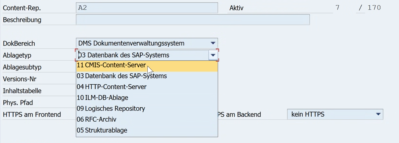
SAP CMIS Adapter in Transaction OAC0
Overall, it is important to note that not all SAP applications automatically support CMIS. The use of CMIS may require specific configurations or enhancements to enable communication between SAP and CMS systems. Therefore, companies considering such an integration should take advantage of SAP documentation and, if necessary, consulting support to understand the steps and opportunities required.
SAP will support the CMIS standard as a SICF service in Netweaver. There is no need to switch from the non-CMIS-capable content server with S4. The ArchivLink standard is also still supported with S4.
Is there a new technique for archiving with SAP – successor ArchivLink?
Currently, there is no direct successor to SAP ArchivLink as a new technology for archiving with SAP. SAP ArchivLink is still one of the main methods for integrating external content management systems (CMS) and archive stores with SAP systems.
But SAP is always evolving, and perhaps there will soon be new ways to secure data. SAP is constantly releasing new updates and versions to better respond to customer needs and provide new solutions.
We recommend that you check the official SAP information from time to time. This will keep you up to date on possible innovations. Perhaps in the future there will be new functions at SAP that improve or complement the ArchivLink.
Further key points:
- Enterprise Content Management Integration (ECMI)
- API – API_CV_ATTACHMENT_SRV
- 3220119 – Business applications in SAP S/4HANA that have adopted Harmonized Document Management (HDM)

