An incorrect invoice at the customer’s site costs twice: credit note, recreation and queries tie up time in sales and accounting. Many companies therefore print out their invoices and check them on paper. This works, but it doesn’t scale – especially not for daily invoices with high document quantities.
With SAP Invoice Control, you can move this visual inspection to the screen. The receipt remains blocked until an employee has checked and approved it. In addition, there are regulatory requirements: Some countries require a national platform to accept the invoice before it is allowed to reach the customer. The blocking and unlocking mechanism is also intended for this.
Functions of SAP Invoice Control
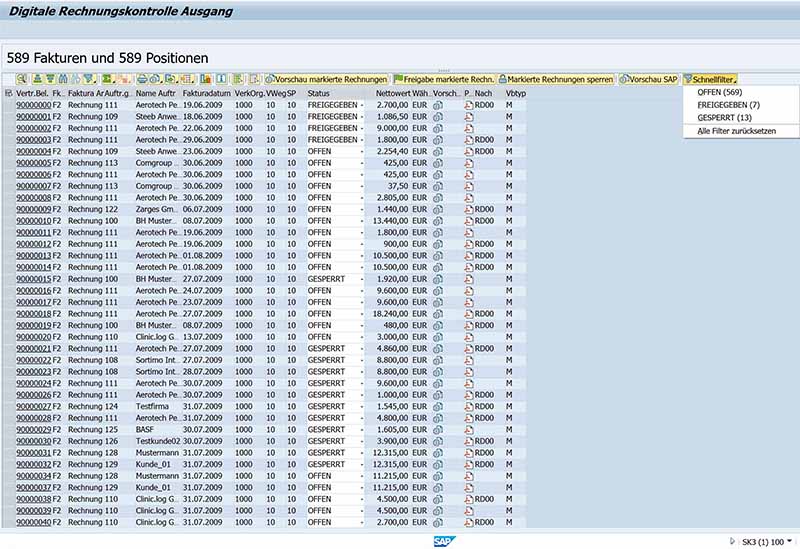
The add-on complements the outgoing invoice in SAP with a cockpit with worklist, visual inspection and status management:
Worklist in the cockpit: Selection by invoice number, billing type, customer, billing date, sales organization, message type, and shipping status.
PDF visual check: Open selected documents as PDFs in the SAP document viewer or in Acrobat Reader – several invoices at the same time if desired.
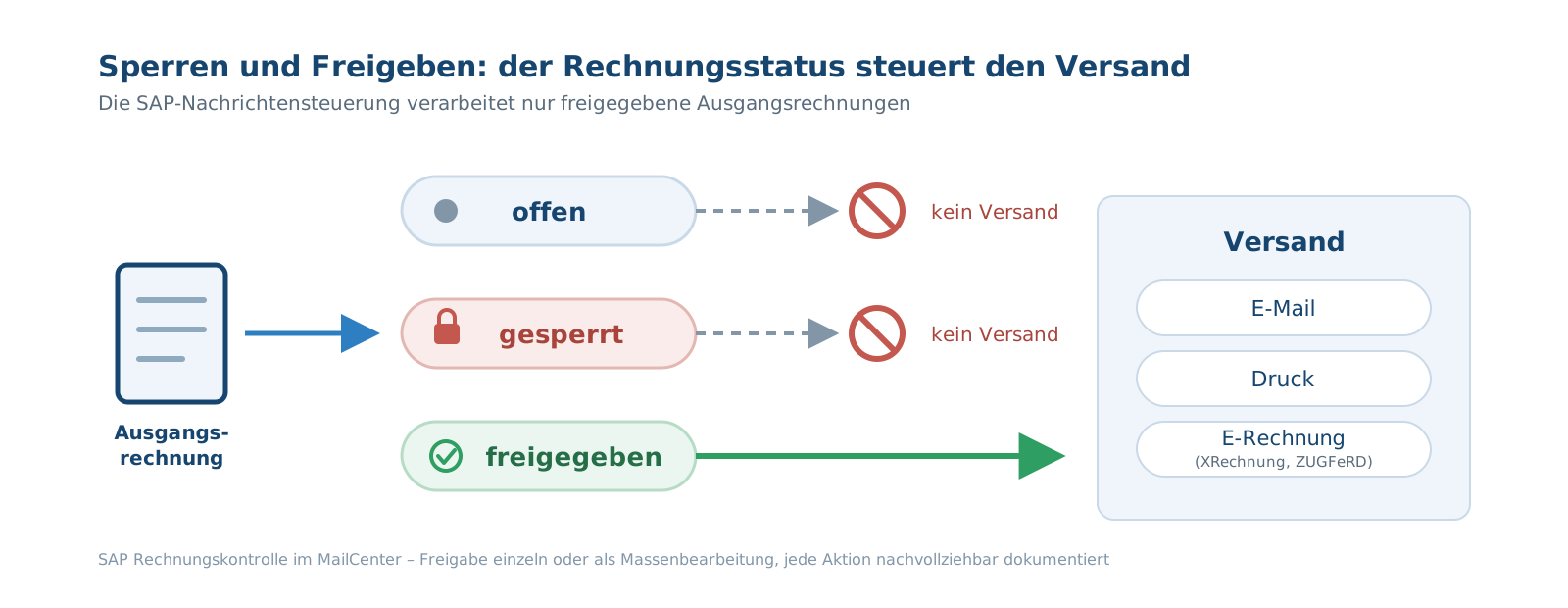
Lock and release: Each billing document has the status Open, Blocked, or Released. Editing works individually or as a bulk share.
Own check logic: A BAdI extension decides according to your criteria which documents are to be checked or when release is permissible.
The process consists of four steps. First, in Customizing, you define which billing documents are subject to control. If a matching invoice is subsequently created, it is considered open and automatically remains blocked. In the third step, the specialist department calls up the worklist and looks through the documents as PDFs. Finally, it releases verified invoices – the message control takes over the sending. Who released and when remains comprehensibly documented.
The documents come directly from the SAP archive: The cockpit accesses the archived invoice PDFs via ArchiveLink. The system checks authorizations for each sales organization.
Invoice control at a glance:
Application area
Outgoing invoices (SD invoices) before dispatch
Advertising
PDF in the SAP document viewer or Acrobat Reader, also collective display
Status
open, blocked, released
Control
Sales organization, billing type, value limit, BAdI for your own logic
Practical example Augustiner-Bräu: Collection control on the screen
Munich’s oldest brewery sends goods invoices as daily invoices, every 10 to 14 days or monthly. In the past, each receipt was printed, individually checked, enveloped and stamped. Today, the control is digital.
The result: Invoices can be checked and approved regardless of location, and the delivery time of each receipt is documented. “The investment costs for the software are recouped after a short time due to the elimination of postage fees,” sums up Dominik Essig, Deputy Head of IT. You can read the complete case study in the Augustiner-Bräu success story.
“Using the MailCenter Invoice Control Outbound application, you can call up several invoices
at the same time for viewing and checking in the SAP document viewer or in Acrobat Reader”
Augustiner-Bräu Wagner KGMatthias Dilger | Contract Department
Practical example: E-invoicing Poland – block invoices until KSeF approval
Poland is introducing mandatory e-invoicing via the national KSeF system: since 1 February 2026 for companies with a turnover of more than PLN 200 million, since 1 April 2026 for all other taxpayers; Micro-enterprises will follow on 1 January 2027. The Polish Ministry of Finance publishes details on podatki.gov.pl (as of July 2026).
For outgoing invoices, this means that a receipt may only be sent to the customer once the platform has accepted it and assigned a KSeF number. This is exactly where the blocking logic of SAP invoice control comes into play. Affected invoices are withheld until the approval of the certified body is available – also automated via BAdI. The SAP E-Invoice page shows how to generate XRechnung, ZUGFeRD, and other formats directly in SAP.
FAQ on SAP Invoice Control
What is SAP Invoice Control for Outgoing Invoices?
SAP Invoice Control is an add-on to the MailCenter platform. It retains outgoing invoices after invoicing, displays them as a PDF on the screen and only releases them for dispatch after they have been checked.
What is the difference to invoice verification with MIRO?
Transaction MIRO checks incoming supplier invoices in Purchasing. On the other hand, SAP invoice control comes into play: It checks its own outgoing invoices from sales before they leave the company.
Can multiple invoices be opened as PDFs at the same time?
Yes. Selected billing documents can be opened either in the SAP document viewer or in Acrobat Reader – also collected. This allows you to check entire billing runs in a single run on the screen without printing out a receipt.
How does the block prevent an invoice from being sent?
The solution is connected to SAP message control. As long as an invoice has the status Open or Blocked, the associated message will not be processed. Only the approval starts sending by e-mail, print or e-invoice.
Does the solution support approvals by external bodies, such as KSeF in Poland?
Yes. Using a BAdI extension, you can link the release to your own conditions, for example to the acceptance of the invoice by the Polish KSeF platform. The receipt remains blocked until the confirmation is received.
Which SAP systems are supported?
SAP Invoice Control runs from SAP ECC 6.0 and SAP S/4HANA, on-premise and in the Private Cloud Edition. No additional hardware or external platforms are required.
Would you like to see invoice control live? Our team will show you how to use it on your own processes and answer your questions directly in the system.