SAP Digital Platform –
MailCenter

Digital Communication for SAP ECC and S/4HANA –

Start your transformation! – With the modular platform from munich enterprise software.

  • Send and receive e-mails, PDF invoices and XRechnung directly from SAP
  • Seamlessly integrated into SAP ECC & S/4HANA
  • Expandable with add-ons and mobile apps
  • Process approvals in SAP via app, e-mail or Fiori – without any paper
  • Automated monitoring of SAP processes – incl. Error notification

Digital Transformation in 3 Steps Insights – Schedule a Live Demo

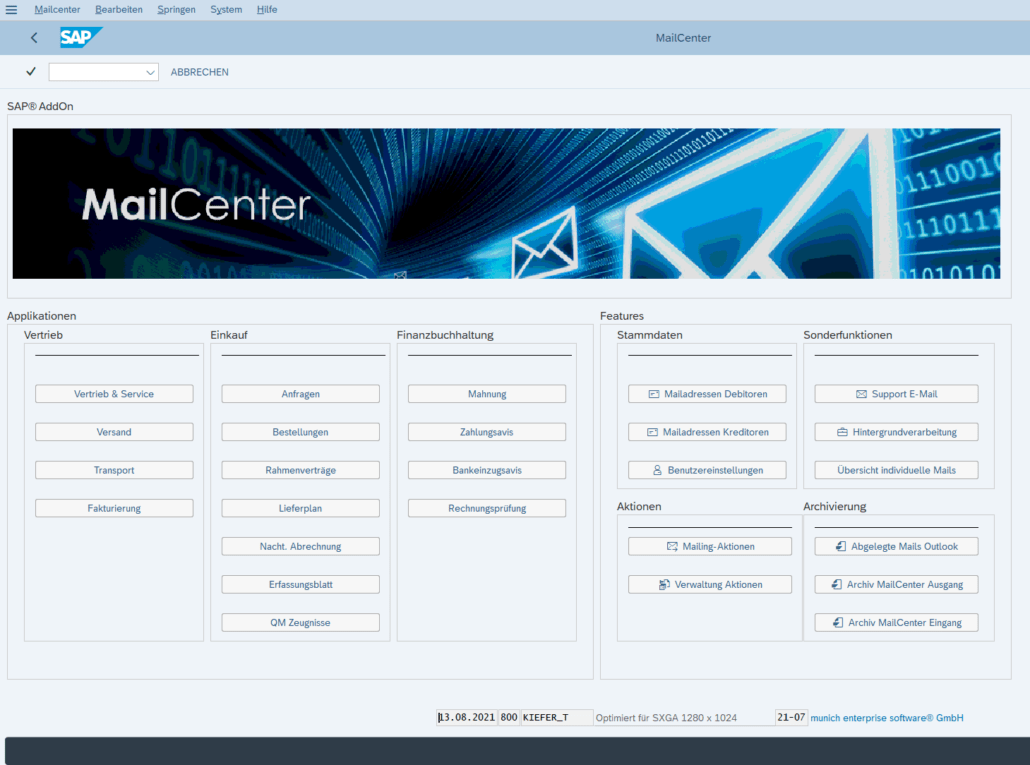
MailCenter Cockpit

SAP Digital Platform – Less Work, More Productivity

sap-mail-mailcenter-box

This software works wonders – even in your company

MailCenter is the platform for SAP to make digital communication efficient. It supports the exchange of electronic documents with business partners, externally and internally. A true SAP innovation to optimize communication and automation.

With the help of modern information and communication technology, you can optimize your value chain and expand existing content management systems. You will gain numerous new opportunities for shaping the digital transformation in your company.

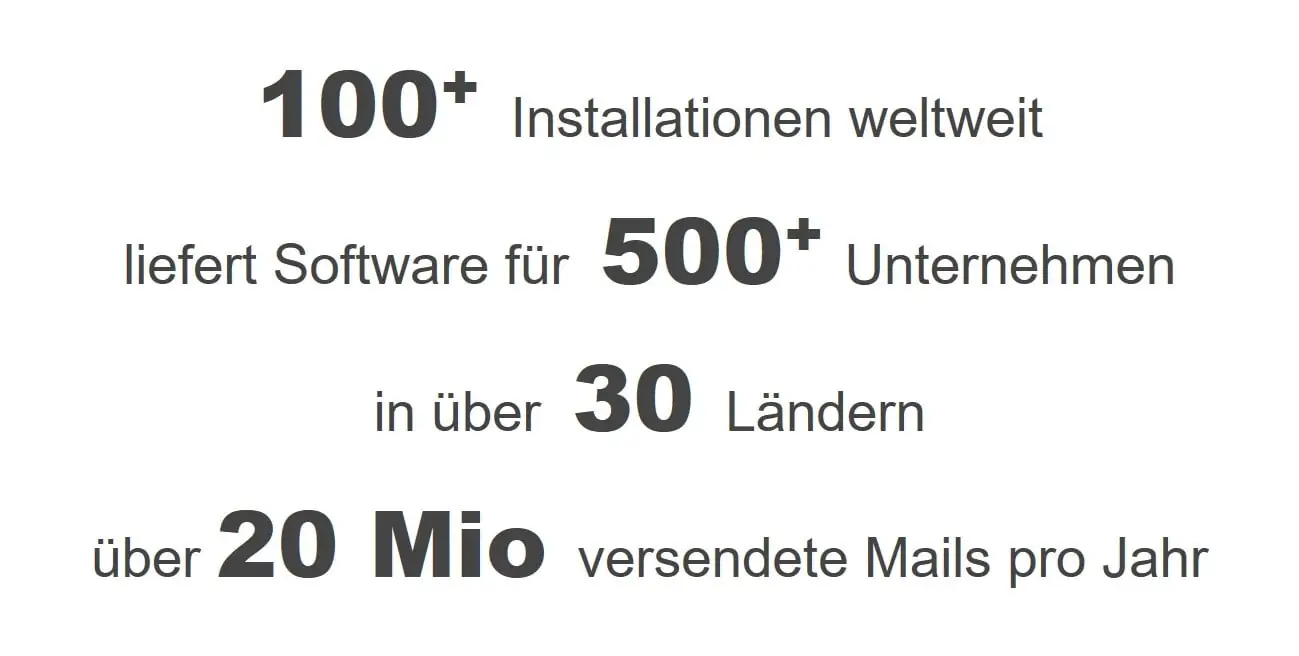
Facts and figures about the MailCenter software

References-Customers

sap-silver partners

SAP Certification - Integration with RISE and SAP S/4HANA Cloud.

DEKRA Certificate ISO 9001

Digital Transformation – EBook

eBook Digital Transformation Thilo Kiefer

SAP Digital – Digitalization and Automation

This is how your company can benefit from our products!

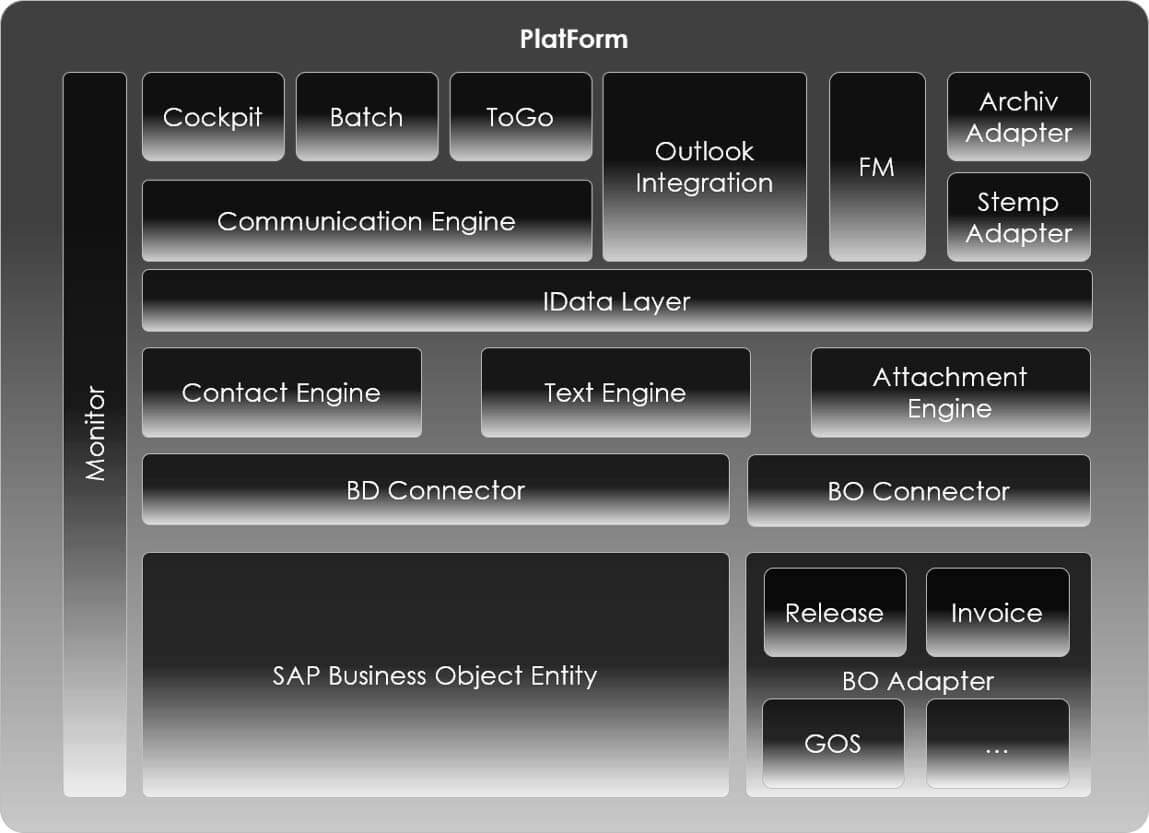
SAP Process Optimization – SAP documents can be sent and received easily, quickly and digitally from the SAP ERP system. Our platform and associated applications are important building blocks in the context of a company-wide enterprise content management strategy. The platform is 100% SAP embedded.

Depending on individual requirements, the platform can be supplemented by applications such as electronic invoices, approval procedures and Outlook integration.

Diagram of the platform cockpit architecture with modules such as Communication Engine, Outlook Integration, IData Layer, and SAP Business Object Entity.
Image shows SAP Fiori Launchpad with MailCenter icons

Data storage – your document data remains in your SAP system

MailCenter is an SAP add-on. It runs entirely in your system: in ABAP, in your client, under your authorizations. Documents, attachments and process data are processed where they are created. There is no intermediate storage with us, no transmission to a service provider and no second database that would have to be kept synchronized.

This also applies to document recognition in incoming invoices. Commercially available solutions transfer incoming invoices to a provider cloud for evaluation. MailCenter does not provide for this: by default, processing remains within your system boundary. If you want to use an external OCR or AI service, it can be connected – the decision is yours, not the product architecture.

What this means in practice:

  • No order processing agreement for your document data because no third party processes it
  • No additional system operation, no additional interface in the emergency and restart concept
  • Archiving via your existing archive via ArchiveLink, not in a third-party system
  • Authorizations, logging, and auditability follow your SAP role concept

Even in a RISE landscape, this does not change: The add-on runs in the system stack you have ordered – the data does not leave it.

Clean Core – Expand without changing the SAP standard

MailCenter is delivered in a namespace registered with SAP and does not change any objects of the SAP standard. Extensions run through the designated paths: released APIs, BAdIs and extension points instead of modifications.

For you, this means one thing above all: When changing releases, there is no need to compare modifications. No SPAU or SPDD rework because of our add-on, no customization project before the next upgrade, no maintenance debt that builds up over the years.

Clean Core does not necessarily mean that extensions have to leave the system and run on a platform next to it. It is crucial that the core remains untouched and that only approved interfaces are used. This is exactly how MailCenter is built: in the system, but without interfering with the standard.

Evidence:

  • SAP Certified Integration for SAP S/4HANA and SAP ECC, including the ATC exam required in the certification process
  • Certified for RISE with SAP
  • Delivery in a namespace registered with SAP, no modification of standard objects
  • ISO 9001 tested development process, certified by DEKRA

FAQ

  1. Centralized email communication

(Input and output seamlessly integrated into the SAP system)

  • E-mail sending – Automated sending from SAP (receipts, messages, etc.)
  • E-mail receipt – process, assign and archive incoming e-mails
  • Outlook Integration – Connection between Outlook and SAP
  • Exchange Connector – Technical connection for Outlook and mail server integration
  • Archiving – Storage of incoming and outgoing mails via SAP ArchivLink
  1. Digital Outbound Processes

(Automate document creation, processing, checking and sending)

  • E-invoice outgoing – XRechnung, ZUGFeRD, PEPPOL
  • Outgoing invoice control – checking and approving outgoing invoices
  • Stamp function – Automatic stamping of documents before shipment
  • Mailing campaigns – serial mails for marketing, sales, reminders, etc.
  • SMS communication – sending short messages directly from SAP
  1. Digital inbound processes

(Capture, check and process incoming documents digitally)

  • Invoice receipt – Cockpit for automated processing of incoming invoices
  • Order Confirmation – Central Review and Reconciliation of Order Responses
  • Goods receipt – Structured processing of incoming delivery notes in the cockpit
  1. Digital approval processes

(Control approvals efficiently and without media discontinuity)

  • Approvals for Sales & Purchasing – Digital approvals of orders, orders, etc.
  • Approval via app & email – approval processes on the go or directly from the email
  • Notification control – Automated alerts and escalations on issues
  1. Monitoring & Performance

(Reliably monitor SAP processes and systems)

  • System Monitoring – Monitoring of system, database, jobs, etc.
  • IDoc Monitoring – Control of IDoc inputs and outputs
  • Process monitoring – monitoring of business-relevant processes
  • KPI Monitoring – Transparency through Key Figures and Reports
  • Application Log Monitoring – Analysis and monitoring of the SAP Application Log for rapid error detection

According to a study by the management consultancy Capgemini, the demands of management on IT managers are clear: We need the expansion of digitalization. This is the most important of all current demands. But what does that mean? What is behind digitalization, Industry 4.0 or digital transformation? According to a survey by the management consultancy Deloitte, medium-sized companies understand everything possible by digitization. From strategic alignment to the paperless office.

For us, digital transformation stands for intelligent business technologies that increasingly support companies in automating processes.

How do we distinguish the terms:

SAP Digitization – On the one hand, this means the conversion of documents and information from analog formats into digital structures. On the other hand, digitization stands for the integration of digital technologies into existing processes.

Digital Transformation – According to SAP, Digital Transformation is“an enterprise-wide initiative to integrate intelligent technology into all business areas to achieve better results and optimize performance and business processes”.

SAP Industry 4.0 – Intelligent and digitally networked systems as well as new information and communication technology are changing and optimizing industrial production.


SAP sees 3 important components of a digital transformation strategy here (see. Article – https://insights.sap.com/what-is-digital-transformation)

  1. Digital – The digitalization of manual processes.
  2. Intelligent – The integration of intelligent technologies such as AI or machine learning.
  3. Management – Understanding and implementing cultural change as a management task.

Digitalization is becoming increasingly important for companies to survive in today’s fast-paced business world. It enables companies to streamline their operations, improve efficiency, and increase productivity.

In addition, it enables companies to reach new customers and expand into new markets through online platforms. Digitalization also allows companies to collect and analyze massive amounts of data, which can help them make more informed decisions and improve their overall performance. It also allows companies to automate repetitive tasks and reduce costs, which can help them increase profitability.

In short, digitalization is crucial for businesses to remain competitive and survive in today’s digital age.

SAP Digital – Would you like more information about our products and services around the topic of digitization?

Make an appointment for a live demo now.

Do you need support or do you have any questions?