


SAP BAdI: Finding, Displaying and Implementing Transactions and Basics Business Add-Ins – What are BAdIs actually? BAdIs (Business Add-Ins) are at the heart of the modern SAP extension concept. They enable developers to extend ABAP programs in a targeted manner and, above all, without modification. The big advantage: Since these are explicit expansion options, your individual adjustments are also retained for system updates or service packs. It doesn’t matter whether you want to optimize standard SAP applications or adapt a partner’s add-ons to your specific business processes.
Table of Contents
- What are BAdIs?
- What is the difference between classic and new BAdIs in SAP?
- What are the most important BAdI transactions in SAP?
- How do you search for classic BAdIs?
- How do you implement the classic BAdI program exits?
- How do you search for new BAdIs?
- How do you implement the new BAdI program exits – Enhancement Spot?
- Possibility via class CL_EXITHANDLER
- Frequently Asked Questions about SAP BAdIs (FAQ)

What are BAdIs?
Briefly explained: BAdIs (Business Add-Ins) are extensibility points in SAP. They allow your own code without changing the SAP standard. This means that adjustments are retained even after updates.
To be more precise, SAP BAdIs is an extensibility option in SAP systems. This allows you to extend the standard code of SAP programs without changing the original code. They also allow developers to implement additional business logic in SAP applications to make specific requirements or customizations.
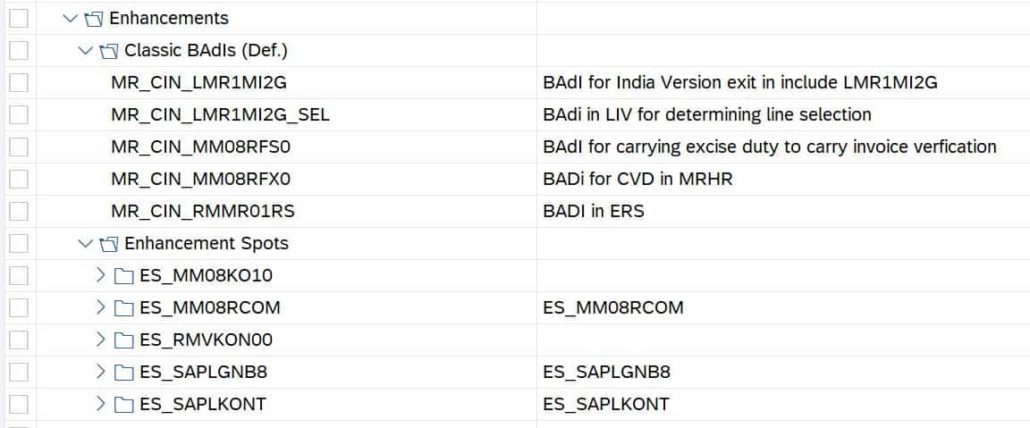
BAdIs are points in the program code where customer-specific code can be inserted. These points are referred to as “engagement points.” Once a BAdI integration point is reached, the developer can write additional code to extend or override the default functionality.
A major advantage of BAdIs is that they provide a clean separation between SAP’s standard code and customer-specific code. This makes it easier to upgrade SAP systems, because the customer-specific code in the BAdIs remains untouched and only the standard code is updated.
BAdIs can also be used in various SAP applications, such as the SAP ERP, SAP CRM, SAP SCM and SAP BW modules. Thus, they offer a flexible expansion option for companies to adapt their SAP systems to their specific business requirements. It is completely independent of whether they are SAP standard programs or add-ons from a partner. This is why BAdIs are also referred to as explicit extension options. In the following article, we will briefly introduce you to how to find and implement these extensions.

What is the difference between classic and new BAdIs in SAP?
Classic BAdIs were introduced into SAP ERP with the enhancement technology. They are based on the classic extension concept and use transactions such as SE18 and SE19 for definition and implementation. While they work similarly to user exits, they are object-oriented. Limitation: There can only be one active implementation at a time, which limits flexibility. New BAdIs, also known as the “Enhancement Framework BAdIs”, were introduced with SAP NetWeaver 7.0. In addition, they are fully integrated into the so-called Enhancement Framework. New BAdIs offer modern, object-oriented concepts, such as:
- Multiple parallel implementations
- Filter-dependent design
- Use in ABAP Objects (e.g. SE24, SE80)
- Uniform technology for extension points, views and methods
Result: New BAdIs are more flexible, easier to integrate and support modern expansion scenarios in SAP ECC and S/4HANA. If you want to develop long-term maintainable extensions, you should prefer new BAdIs.
What are the most important BAdI transactions in SAP?
In SAP, there are a number of transactions that are relevant for working with Business Add-ins (BAdIs). Here is an overview of the most important transactions:
| Transaction | Type | Description |
|---|---|---|
SE18 |
Classic & New | Definition of classic BAdIs and display of enhancement spots |
SE19 |
Classic | Implementation of classic BAdIs |
SE20 |
New | Maintaining BAdIs in the Enhancement Framework |
SE24 |
New | Creating and editing classes (e.g. for new BAdIs) |
SE80 |
Both | Object Navigator – Central Development Environment |
SE81 |
Classic | Repository Information System (Deprecated Transaction – Shows Structural Help) |
SE84 |
Both | Repository Information System (Current – Search for BAdIs, Classes, etc.) |
SE37 |
Aids | Displaying Function Modules – Helpful for Exit Analysis |
SXMB_MONI |
Across the board | Monitoring for BAdIs in the context of PI/PO (optional, depending on the application) |
Overall, these transactions form the technical backbone for the development and implementation of extensions via BAdIs – both in the classic and in the new enhancement framework.
How do you search for classic BAdIs?
SE84, SE81 or program-related
You have various options for searching for classic BAdIs:
- Free search via transaction SE84 – List of freely selected BAdIs
- Application-Related Search via Transaction SE81 – List of Application-Related BAdIs
- Program-related search: Search for “GET_INSTANCE” in the program, the function module or in the method. Then navigate to the variable definition by double-clicking on the reference variable. You can also set a breakpoint in the method GET_INSTANCE and call the program. Then navigate to the interface by double-clicking on the BAdI interface. Start to CL_EX_ the where-used list in classes. For transaction SE18 , you will usually find documentation for the respective BAdI, which you should definitely read before starting the implementation.
How do you implement the classic BAdI program exits?
Steps for creating a BAdI implementation (BAdI usage)
To use the respective BAdI for your use case, proceed as follows. First, use transaction SE18 to display the definition of BAdI. You use transaction SE18 or transaction SE19 to choose Create Implementation. Enter a name for the BAdI implementation. For naming, we recommend simply putting a Z in front of the BAdI name for the BAdI implementation. For the implementation class, use ZCL+BAdI names. By double-clicking on the methods, you can now implement the desired methods. Then activate both the method(s) of the implementation class and the BAdI implementation. Ready!

How do you search for new BAdIs?
Basically, the new BAdI technique works very similarly to the classic BAdI technique. However, this technique is much more performant, because no adapter classes are created here. The search for a suitable BAdI (Enhancement Spot) is analogous to the search for classic BAdIs. However, in the program-related search, we are not looking for GET_INSTANCE but for GET_BADI.
How do you implement the new BAdI program exits – Enhancement Spot?
There are also various ways to do this. Display the desired enhancement spot via transaction SE18. Use the Implement Extension menu (F6) to create the implementation. Give a name for the extension implementation and the BAdI implementation. Maintain the attributes for the BAdI implementation. In the navigation pane, click Implementing Class. Double-click to implement the desired methods. You then enable the method(s) and extension implementation. Ready.
Possibility via class CL_EXITHANDLER
When BAdIs is called, the class class CL_EXITHANDLER is traversed. This class again contains the method GET_INSTANCE (see above). With the help of a breakpoint within the method, you can examine this BAdI in more detail. To do this, use transaction SE80 or transaction SE24. The variable EXIT_NAME contains the name of the current BAdI. Do you have any questions about SAP BAdIs? We would be happy to advise you in a personal meeting.
Frequently Asked Questions about SAP BAdIs (FAQ)
What is a BAdI in SAP?
A BAdI (Business Add-In) is an extension point in SAP. It allows you to use your own code without changing the SAP standard. Adjustments are thus retained for updates.
What is the difference between SE18 and SE19?
First, you define and analyze with SE18 classic BAdIs. Then you create the implementation with .SE19 SE18 also shows the documentation on the BAdI.
What is transaction SE84 used for?
SE84 is the current repository information system. You can use it to find BAdIs, classes and other objects. It replaces the deprecated transaction SE81.
What is the difference between classic and new BAdIs?
Classic BAdIs only allow active implementation. On the other hand, new BAdIs (Enhancement Framework) allow multiple implementations and filters. New BAdIs are more performant and recommended for S/4HANA.
How do I find the right BAdI in the program?
Search for GET_INSTANCE (classic) or GET_BADI (new) in the coding. A breakpoint in the method helps with the analysis. The variable EXIT_NAME shows the name of the BAdi.

